HKeRouting2.0.3
Publisher Description
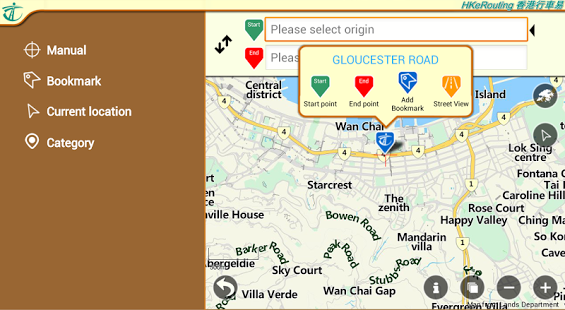
This application provides driving route, real-time traffic condition and parking information for pre-trip planning.
Features include:
1. point-to-point driving-route searching
2. multiple input methods: map-based, text, category and current location
3. the shortest distance, shortest travel time, and lowest toll (private cars only) driving routes
4. real-time traffic information: special traffic news, CCTV snapshots along the route, special traffic/transport arrangement, speed map panels, cross-harbour journey times and traffic speed map
5. driving-related information: petrol stations and no-stopping restrictions
6. parking information: on-street parking space and car park information (including real-time parking vacancy information of some car parks)
7. bookmark function
This App requires Android OS 2.3 or above and minimum display resolution of 320 x 480 pixel.
Keywords: Hong Kong, eRouting, hkerouting, HKeRouting, route, route enquiry, trip plan, traffic, real time, traffic news, private car, parking, driving, Hong Kong eRouting, hk, erouting, td, transport department, hksarg, eroute, cctv, snapshots, webcasts, speed map panel, SMP, nearby, car park, parking space, vacancy, on-street
About HKeRouting
The company that develops HKeRouting is Transport Department, the Government of HKSAR. The latest version released by its developer is 2.0.3. This app was rated by 1 users of our site and has an average rating of 4.0.
To install HKeRouting on your Android device, just click the green Continue To App button above to start the installation process. The app is listed on our website since 2016-10-04 and was downloaded 13 times. We have already checked if the download link is safe, however for your own protection we recommend that you scan the downloaded app with your antivirus. Your antivirus may detect the HKeRouting as malware as malware if the download link to com.td.drss is broken.
How to install HKeRouting on your Android device:
- Click on the Continue To App button on our website. This will redirect you to Google Play.
- Once the HKeRouting is shown in the Google Play listing of your Android device, you can start its download and installation. Tap on the Install button located below the search bar and to the right of the app icon.
- A pop-up window with the permissions required by HKeRouting will be shown. Click on Accept to continue the process.
- HKeRouting will be downloaded onto your device, displaying a progress. Once the download completes, the installation will start and you'll get a notification after the installation is finished.
Program Details
General
System requirements
Download information
Pricing
Version History
version 2.0.3
posted on 2016-10-04
- Fixed minor issues
version 1.1
posted on 2013-04-10
Several fixes and updates
